• Facebook
  • Twitter
  • LinkedIn
  • Mail
  • Youtube
  • Advanced Product Search
  • Login / Register
  • My Account
  • Questions? | Email Us!
  • 480-948-5555
Interface
  • Industry Solutions
      • Industry Solutions

      • Our customers work in aerospace, automotive, energy, medical, industrial automation industries and test labs. If you are looking for inspiration or ideas, check out our solutions by industry.
      • Learn More
      • Aerospace
      • Agriculture
      • Automotive and Vehicle
      • Consumer Products
      • Education
      • Energy
      • Entertainment
      • Industrial Automation
      • Infrastructure
      • Internet of Things
      • Lifting
      • Manufacturing
      • Maritime
      • Medical and Healthcare
      • Natural Resources
      • Original Equipment Manufacturer
      • Test and Measurement
      • Weighing
  • Product Applications
      • Product Applications

      • Explore the diverse array of case studies, white papers, and application notes tailored to showcase the transformative potential of our products.
    • Applications Notes
      • Our skilled application engineers work with our customers to provide load, torque, multi-axis and force measurement solutions. Take a look at our library of Interface Application Notes.
    • Case Studies
      • Interface Case Studies are real examples of how our products are used for various applications, from packaging robots to launching rockets.
    • White Papers
      • Our technical white papers provide detailed insights, tips and expertise about various measurement technologies and use cases.
  • Products
    • Product Overview
      • Dynamic Product Categories
        • Complete SystemsComplete Systems
        • Load CellsLoad Cells
        • Mini Load CellsMini Load Cells
        • Load Button Load CellsLoad Button Load Cells
        • Multi-Axis SensorsMulti-Axis Sensors
        • Torque TransducersTorque Transducers
        • Load Pins, Tension Load Links, and Load ShacklesLoad Pins, Tension Load Links, and Load Shackles
        • InstrumentationInstrumentation
        • Digital InstrumentationDigital Instrumentation
        • WirelessWireless
        • Hazardous LocationsHazardous Locations
        • Calibration EquipmentCalibration Equipment
        • Load Cell SimulatorsLoad Cell Simulators
        • AccessoriesAccessories
        • G-SeriesG-Series
  • Product Guides
      • Interface Guides

      • Interface Guides are helpful resources to navigate our products. Our team has developed a series of instructional online tools that provide useful information about all the options available in our robust catalog.
      • Learn More
      • Load Cell Selection Guide
      • Multi-Axis Sensor Selection Guide
      • Mini™ Load Cell Selection Guide
      • Torque Transducer Selection Guide
      • Torque Coupling Selection Guide
      • Instrumentation Selection Guide
      • Complete Systems
      • Wireless and Bluetooth® Selection Guide
      • Cable Assemblies Guide
      • Accessories Selection Guide
      • Calibration Equipment Selection Guide
      • Load Pin Configuration Submission
      • Weighing Solutions Guide
      • Lifting Solutions Guide
      • Data AQ Pack Guide
      • BlueDAQ Software Guide
      • Caris Codes Guides
      • Interface Load Cell Field Guide
      • ForceEDU
  • Services
    • Interface Technical Services
      • 50+ years of combined experience calibrating and repairing load cells and 100,000+ calibrations performed annually.
    • ISO 17025 Scope of Accreditation
      • Interface calibration certificates are the most complete in the industry.
    • Calibration Services
      • Interface provides calibration services on load cells and other force measurement devices from nearly any manufacturer.
    • Repair Services
      • Interface provides repair services on load cells and other force measurement devices from nearly any manufacturer. Repairs include a complete evaluation of the device prior to repair and calibration upon completion.
    • Load Cell Troubleshooting
      • Performance of a load cell force (or weigh) measurement system is dependent upon the integrity of the physical installation, correct interconnection of the components, proper performance of the basic components which make up the system, and calibration of the system.
  • Custom Solutions
      • Custom Solutions

      • Interface Custom Solutions empowers you to utilize our expert engineering, design and manufacturing teams to build custom force, torque and specialty products that are customized to meet your exact needs, with precision.
      • Learn More
      • Custom OEM Solutions
      • Custom Integrated Solutions
      • System Level Calibration
  • Support
    • Locate Reps and Distributors
      • Interface’s success is due to our global network and partnership with its representatives and distributors.
    • Catalogs and Brochures
      • Interface offers downloadable PDF catalogs and brochures, including product, industry, and service guides.
    • Installation and Operation Manuals
      • Find installation and operation manuals for load cells, torque, multi-axis, load pins, links, shackles, instrumentation.
    • Software and Drivers
      • Download drivers, software and mobile apps.
    • Electrical Wiring and Diagrams
      • Electrical selection chart, load cell cable and connector wiring diagrams and more.
    • Technical Library
      • Our technical library covers cable length effects, glossaries, system calibrations, and load cell troubleshooting resources.
    • ForceEDU
      • Welcome to Interface’s ForceEdu – your go-to resource for training and professional development of Interface’s products and more. Here, you’ll find a wealth of educational materials, including training videos, 101 articles, blogs, and brochures.
  • Company
      • Company Overview

      • Founded in 1968, Interface is a U.S. based, women-owned technology and manufacturing company of the world’s best load cells, headquartered in Scottsdale, Arizona.
      • Learn More
    • Interface Capabilities
      • Interface is the world’s trusted leader in technology, design, and manufacturing of force measurement solutions. We empower engineers around the world to measure force and performance at the highest degree.
    • Trade Shows and Events
      • Throughout the year and across the globe, Interface hosts virtual ForceLeaders events, local ForceLeaders Summits, exhibits at trade shows and presents at global conferences.
    • Careers
      • Our business encompasses many different functions and capabilities, allowing you to explore careers in various fields. You can discover engineering, finance, manufacturing, marketing, product development, sales, and more opportunities.
    • Certifications and Compliance
      • Interface designs and manufactures high-performance sensors and instrumentation, ensuring ISO-compliant quality for the test and measurement market. We’re dedicated to delivering precision, reliability, and superior quality in every product.
    • InterfaceIQ Podcast
      • Listen to the InterfaceIQ Podcast, hosted by Max Newton and Molly Moment. The podcast created for new listeners, engineers, and innovators who want to learn more about force measurement technology!
  • Blog
  • –Our technical library covers cable length effects, glossaries, system calibrations, and load cell troubleshooting resources.
  • Menu Menu
  • 0Shopping Cart
You are here: Home1 / Products2 / Wireless3 / Base Stations4 / WTS-BS-2 Wireless Base Station with Industrial Interfaces5

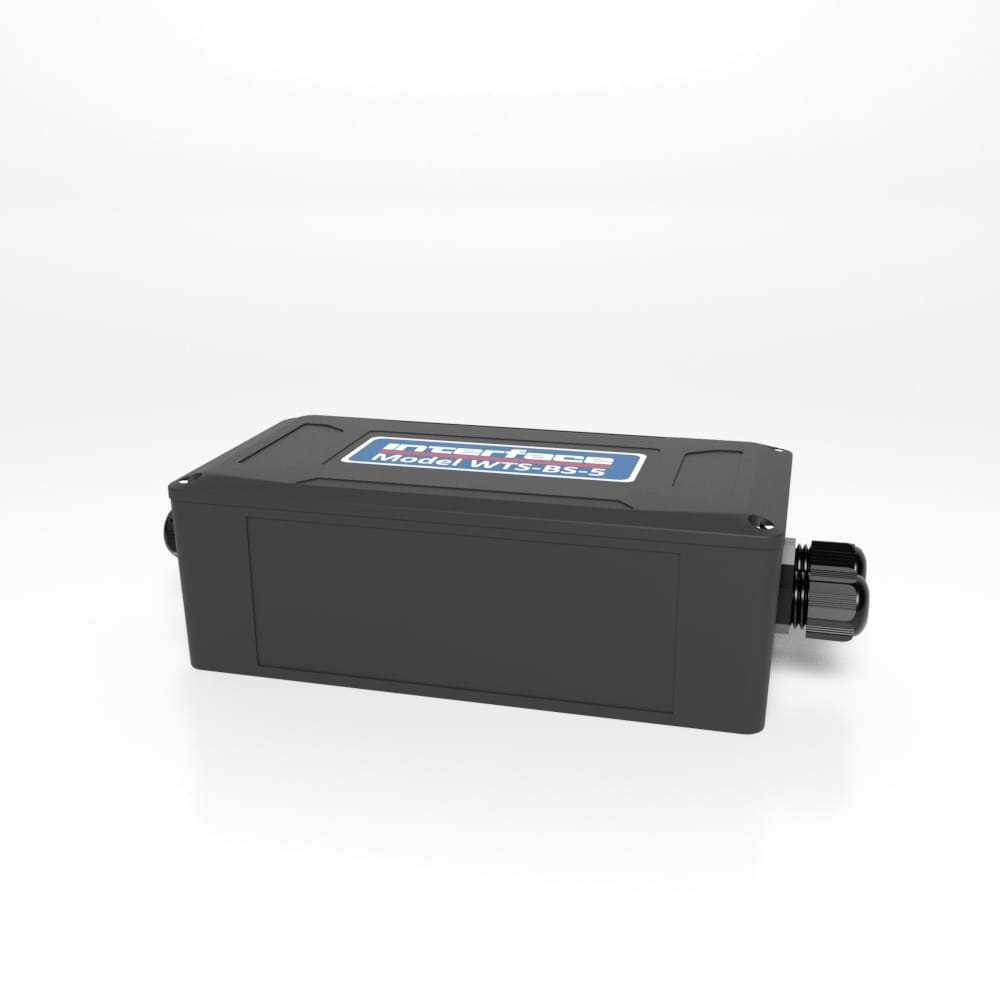
WTS-BS-2 Wireless Base Station with Industrial Interfaces
PRICING NOTICE

The pricing listed on our website is only for U.S. buyers and all pricing is subject to change without notice. Any inquiries for products from buyers outside of the U.S. will receive a quote and availability from the licensed distributor nearest your region. These prices will be based on product availability, currency conversions, markets, taxes, shipping costs, as well as local support.

WTS-BS-2 Wireless Base Station with Industrial Interfaces

Wireless Analog Output Receiver Module

Get Your Free Quote

The WTS-BS-2 is one of a range of base stations that are required for configuration and calibration of the WTS modular telemetry system. Base stations can also be used for data collection systems by making available the WTS wireless transmitter data over the industrial interfaces.

The data sent by transmitter modules can be utilized by multiple receivers such as displays, handheld readers, analog outputs, relay modules and computer interfaces. Receivers support common industrial power supplies and are available in robust IP rated enclosures with internal antennas optimized to give outstanding coverage.

The WTS-BS-2 supports USB, RS232 and RS485 connectivity. On Windows PCs the free WTS Toolkit is used to configure and calibrate the WTS modular telemetry system while the free WTS logging and visualization software allows monitoring and data collection.

Product Downloads

Please login or register for Product Pricing and File Access

  • Data Sheet
  • WTS User's Manual
  • WTS Brochure
  • Wireless Modular System
  • Interface Log100
  • WTS- Wireless Load Cell Communication System

The WTS-BS-2 is one of a range of base stations that are required for configuration and calibration of the WTS modular telemetry system. Base stations can also be used for data collection systems by making available the WTS wireless transmitter data over the industrial interfaces.

Please Login to view pricing and product downloads

Need a quote or looking to purchase this item?

Login, scroll to see your model descriptions and SKU part number, then use the Request for Quote button to submit your request.

Request a QuoteRequest a CAD File

SKU: WTS-BS-5-1 Categories: Base Stations, Instrumentation, Quickship, Wireless Tag: quickship
  • Features and Benefits
  • Specifications
  • Dimensions
  • Connector Pin Diagram
  • Shipping Information
  • Product Video

Features and Benefits

  • Controllable baud rates
  • Configure & calibrate the WTS devices
  • USB/RS232/RS485 interface
  • Rugged enclosure
  • Data collection for PC/PLC

Specifications

Specifications


U.S. dimensions and capacities are provided for conversion only. Standard products have International System of Units (SI) capacities and dimensions.

Dimensions

Dimensions - WTS-BS-5


U.S. dimensions and capacities are provided for conversion only. Standard products have International System of Units (SI) capacities and dimensions.

Connector Pin Diagram

Connections

WTS-BS-3, WTS-BS-3E & WTS-BS-4

These base stations simply connect to the USB port of a PC and are powered from the USB bus.

WTS-BS-2

This diagram shows the available connections, switches and LEDs.a

The interface can be selected from the DIP switches SW1 as can baud rates for serial interfaces and
the Address of the base station.

SW1 Settings

Address

Switch positions 1 to 4 select the base station Address. This should normally be 1.

Address 1 2 3 4
1 Off Off Off Off
2 On Off Off Off
3 Off On Off Off
4 On On Off Off
5 Off Off On Off
6 On Off On Off
7 Off On On Off
8 On On On Off
9 Off Off Off On
10 On Off Off On
11 Off On Off On
12 On On Off On
13 Off Off On On
14 On Off On On
15 Off On On On
16 On On On On

Serial/USB

Switch positions 5 to 7 set whether serial or USB is used. If USB is not selected then the chosen switch settings control the baud rate for the serial interface. Whether the serial interface is RS485 or RS232 is selected by switch position 8.

Baud Rate / USB 5 6 7
USB Off Off Off
9600 On Off Off
19200 Off On Off
38400 On On Off
57600 Off Off On
115200 On Off On
230400 Off On On
460800 On On On

A baud rate of 9600 (and in some cases 19200) is not suitable for 2 way communication with remote modules as it is too slow and causes timeouts. This baud rate has been in-cluded to enable the base station to be connected to a 9600 baud device to allow low rate Data Provider packets to be received.

At any rate below 230400 is may be possible to lose packets at high data rates as the serial connection cannot keep pace with the radio transmissions.

If USB is not selected as the interface (Switch positions 5 to 7) then this switch position selects whether the serial interface is RS232 or RS485.

232/485 8
RS232 Off
RS485 On

Power

USB base stations will be powered by the USB bus. If RS232 or RS485 are selected then external power will need to be connected to J4 on the –V and +V pins.

LED Indication

Two LEDS indicate Power/Mode and Activity.

The red LED indicates mode and should flash at a 2Hz rate. If any errors are detected with the radio then the LED will remain lit.

The green LED flashes once for each packet received or transmitted via radio, USB or serial.

RS232

The RS232 interface uses TX, RX and GND to connect to a PC, PLC etc. and uses standard RS232 voltage levels.

The baud rate can be selected by setting the DIP switches stated above.

The base station will require power cycling to utilize a baud rate change.

For more information visit Electrical Wiring Diagrams

Additional Information

Dimensions 3.30 × 6.50 × 2.20 in

Product Video

  • Features and Benefits
  • Specifications
  • Dimensions
  • Connector Pin Diagram
  • Shipping Information
  • Product Video

Features and Benefits

  • Controllable baud rates
  • Configure & calibrate the WTS devices
  • USB/RS232/RS485 interface
  • Rugged enclosure
  • Data collection for PC/PLC

Specifications

Specifications


U.S. dimensions and capacities are provided for conversion only. Standard products have International System of Units (SI) capacities and dimensions.

Dimensions

Dimensions - WTS-BS-5


U.S. dimensions and capacities are provided for conversion only. Standard products have International System of Units (SI) capacities and dimensions.

Connector Pin Diagram

Connections

WTS-BS-3, WTS-BS-3E & WTS-BS-4

These base stations simply connect to the USB port of a PC and are powered from the USB bus.

WTS-BS-2

This diagram shows the available connections, switches and LEDs.a

The interface can be selected from the DIP switches SW1 as can baud rates for serial interfaces and
the Address of the base station.

SW1 Settings

Address

Switch positions 1 to 4 select the base station Address. This should normally be 1.

Address 1 2 3 4
1 Off Off Off Off
2 On Off Off Off
3 Off On Off Off
4 On On Off Off
5 Off Off On Off
6 On Off On Off
7 Off On On Off
8 On On On Off
9 Off Off Off On
10 On Off Off On
11 Off On Off On
12 On On Off On
13 Off Off On On
14 On Off On On
15 Off On On On
16 On On On On

Serial/USB

Switch positions 5 to 7 set whether serial or USB is used. If USB is not selected then the chosen switch settings control the baud rate for the serial interface. Whether the serial interface is RS485 or RS232 is selected by switch position 8.

Baud Rate / USB 5 6 7
USB Off Off Off
9600 On Off Off
19200 Off On Off
38400 On On Off
57600 Off Off On
115200 On Off On
230400 Off On On
460800 On On On

A baud rate of 9600 (and in some cases 19200) is not suitable for 2 way communication with remote modules as it is too slow and causes timeouts. This baud rate has been in-cluded to enable the base station to be connected to a 9600 baud device to allow low rate Data Provider packets to be received.

At any rate below 230400 is may be possible to lose packets at high data rates as the serial connection cannot keep pace with the radio transmissions.

If USB is not selected as the interface (Switch positions 5 to 7) then this switch position selects whether the serial interface is RS232 or RS485.

232/485 8
RS232 Off
RS485 On

Power

USB base stations will be powered by the USB bus. If RS232 or RS485 are selected then external power will need to be connected to J4 on the –V and +V pins.

LED Indication

Two LEDS indicate Power/Mode and Activity.

The red LED indicates mode and should flash at a 2Hz rate. If any errors are detected with the radio then the LED will remain lit.

The green LED flashes once for each packet received or transmitted via radio, USB or serial.

RS232

The RS232 interface uses TX, RX and GND to connect to a PC, PLC etc. and uses standard RS232 voltage levels.

The baud rate can be selected by setting the DIP switches stated above.

The base station will require power cycling to utilize a baud rate change.

For more information visit Electrical Wiring Diagrams

Additional Information

Dimensions 3.30 × 6.50 × 2.20 in

Product Video

Additional Products

  • BSC4A Multi-Channel Analog Output Bridge Amplifier

    Buy Now!Please Login to view pricing and product downloads
    Read more
  • 9330 battery powered high speed data logging indicator

    Buy Now!Please Login to view pricing and product downloads
    Read more
  • CSD Embedded Load Cell Converter and Digitizer Module

    Buy Now!Please Login to view pricing and product downloads
    Read more
  • DMA2 DIN RAIL MOUNT SIGNAL CONDITIONER

    DMA2 DIN Rail Mount Signal Conditioner

    Buy Now!Please Login to view pricing and product downloads
    Read more Show Details

Featured in these Application Notes

    Conveyor Belt Adhesion Test

All Products

  • Load Cells
  • Interface Mini
  • Load Button Load Cells
  • Multi-Axis Sensors
  • Torque Transducers
  • Load Pins, Tension Links, and Load Shackles
  • Instrumentation
  • Digital Instrumentation
  • Wireless Telemetry System
  • Bluetooth® Telemetry System
  • Intrinsically Safe
  • Calibration Systems
  • Accessories
  • G-Series

Contact Us

  • Customer Support
  • Contact Form
  • Career Opportunities
  • Certifications and Compliance
  • Locate A Rep or Distributor

Solutions

  • ForceEDU
  • Custom Solutions
  • Industry Solutions
  • Application Notes
  • Animated Application Notes
  • Case Studies
  • White Papers
  • Interface Training Videos

Services

  • Calibration and Repair Request
  • Load Cell Troubleshooting
  • Software and Drivers
  • Technical Library

News

  • Events
  • Newsletter
  • Interface IQ Blog
  • InterfaceIQ Podcast
ISO 17025 Scope Accreditation
Copyright 2026 - Interface, Inc.
  • Warranty And Repair Policy
  • Privacy Policy
  • Certifications and Compliance
PBLC3 Pillow Block Load Bearing Load Cell BSC1-HD Single Channel PC Interface Module with Analog Output BSC1-HD Single Channel PC Interface Module with Analog Output
Scroll to top

We use cookies to enhance your browsing experience, serve personalized content, and analyze our traffic. By clicking "Accept All Cookies", you consent to our use of cookies.

Accept All CookiesReject AllCookie Settings

Cookie and Privacy Settings


How we use cookies

How we use cookies

We may request cookies to be set on your device. We use cookies to let us know when you visit our websites, how you interact with us, to enrich your user experience, and to customize your relationship with our website.

Click on the different category headings to find out more. You can also change some of your preferences. Note that blocking some types of cookies may impact your experience on our websites and the services we are able to offer.

Essential Website Cookies

Essential Website Cookies

These cookies are strictly necessary to provide you with services available through our website and to use some of its features.

Because these cookies are strictly necessary to deliver the website, you cannot refuse them without impacting how our site functions. You can block or delete them by changing your browser settings and force blocking all cookies on this website.

Google Analytics Cookies

Google Analytics Cookies

These cookies collect information that is used either in aggregate form to help us understand how our website is being used or how effective our marketing campaigns are, or to help us customize our website and application for you in order to enhance your experience.

If you do not want us to track your visit to our site, you can disable tracking in your browser here:

Other external services

Other external services

We also use different external services like Google Webfonts, Google Maps and external Video providers. Since these providers may collect personal data like your IP address we allow you to block them here. Please be aware that this might heavily reduce the functionality and appearance of our site. Changes will take effect once you reload the page.

Google Webfont Settings:

Google Map Settings:

Privacy Policy

Privacy Policy

I agree to the terms and conditions laid out in the Privacy Policy

Update Your SettingsDo not accept and hide notification
Open Message Bar

Please share your location to continue.

Check our help guide for more info.

share your location