Solution


Printer Cartridge Seal

An ink manufacturer wants to ensure there is a proper seal between their ink cartridge caps and the cartridge body, in order for it to work effectively in their printers. A bad seal can cause leaks, clogging, and overall a poor performance for their printers.

Summary

  • Customer Need / Challenge

    An ink manufacturer wants to ensure there is a proper seal between their ink cartridge caps and the cartridge body, in order for it to work effectively in their printers. A bad seal can cause leaks, clogging, and overall a poor performance for their printers.

  • Interface Solution

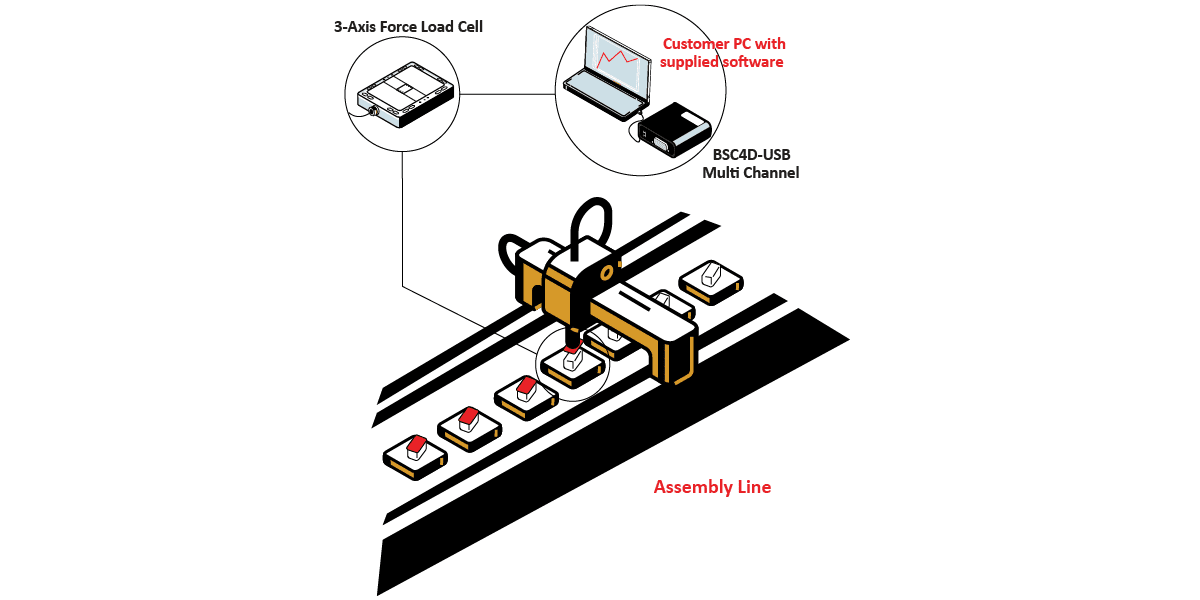
    Interface’s solution is to measure the pressure exerted on the cartridge cap by installing the 3A120 3-Axis Load cell under the plate during the automatic production line process. Results will be logged, graphed, and stored when the customer’s PC or laptop is connected to the BSC4D Multi-Channel PC Interface Module with supplied BlueDAQ software.

  • Results

    The ink manufacturer was able to determine the exact amount of force it took to seal their ink cartridge caps onto the cartridge bodies to prevent any leaks or clogging.

Materials


  • 3A120 3-Axis Load cell
  • BSC4D Multi-Channel PC Interface Module with supplied BlueDAQ software
  • Customer PC or Laptop

How it Works


  1. The 3A120 3-Axis Force Load Cell is fixed under a plate on the assembly line.
  2. On the assembly line, a robotic arm pushes the ink cartridge cap onto the ink cartridge body. The forces are measured by the 3-Axis Load cell.
  3. Force results will be logged, graphed, and stored when the customer’s PC or laptop is connected to the BSC4D Multi-Channel PC Interface Module with supplied BlueDAQ software.

Download PDF